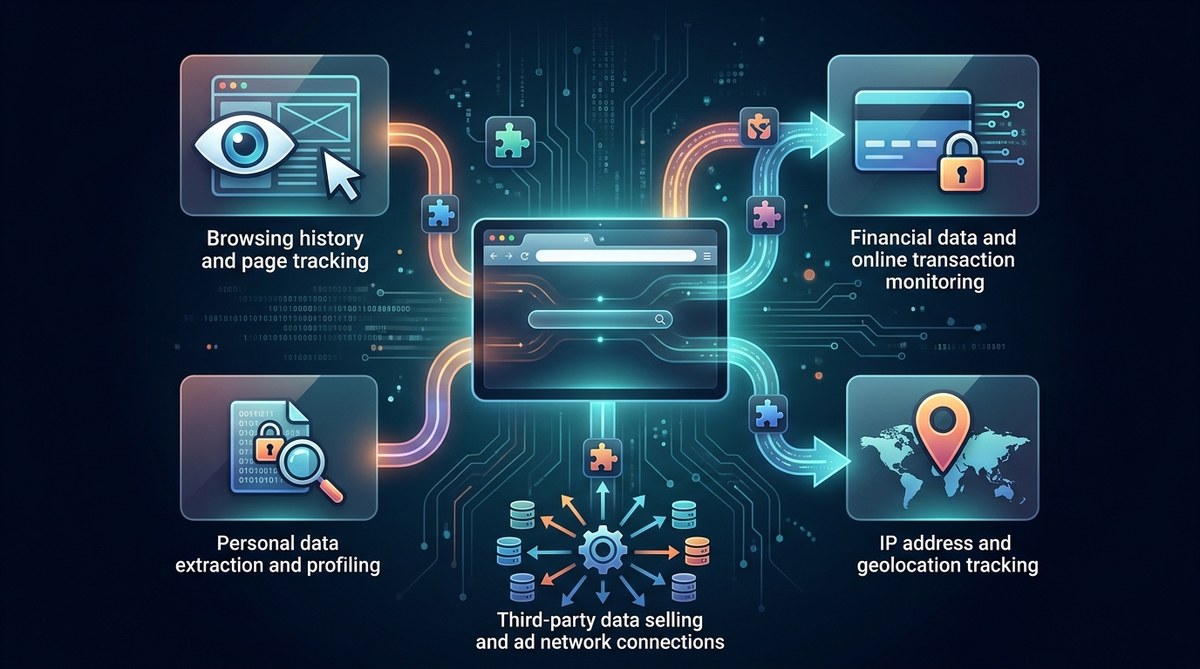
You probably have at least a dozen browser extensions installed right now. Maybe you have an ad blocker, a coupon finder, a grammar checker, and a tab manager. They all promise to make your life easier. But here is the uncomfortable truth: many of them are quietly watching everything you do. Every site you visit, every product you search for, every password you type. And in many cases, they are selling that information to the highest bidder.
Browser extensions are not just helpful tools. They can act as silent data harvesters that log your browsing history, inject ads, steal passwords, and sell your personal information. The worst part is that most users never read the permissions they grant. By understanding how these extensions operate, you can take back control of your digital privacy today.
How browser extensions secretly monitor your activity
Most people assume that browser extensions work only when you interact with them. That is not true. Once you grant permissions during installation, an extension can run in the background continuously. It can see every website you load, every form you fill out, and every search query you type. This is not a bug. It is a feature baked into how browser extensions are designed.
Here is a breakdown of the most common ways these tools track you without your knowledge:
- Background data harvesting: Extensions can collect your browsing data even when you are not actively using them. They log every URL you visit and send it to a remote server.
- Keystroke logging: Some extensions record every key you press, including passwords and credit card numbers.
- Session hijacking: Malicious extensions can steal your login cookies and impersonate you on other sites.
- Ad injection: Extensions can replace legitimate ads with their own, often redirecting you to phishing pages.
- DOM manipulation: Extensions can read and modify the content of any webpage you visit, extracting sensitive data like banking details.
The 5 sneakiest tracking techniques used by browser extensions
Let us get specific. Here are the five most common ways your extensions are tracking your every move.
1. Selling your browsing history to data brokers
This is the biggest one. Many free extensions make money not by charging you, but by selling your data. When you install a coupon finder or a weather widget, the extension logs every site you visit. It builds a profile of your interests, your shopping habits, your political leanings, and even your health concerns. That profile gets sold to data brokers who then sell it to advertisers, insurance companies, and employers.
Researchers have found that some extensions with millions of installs are essentially spyware wrapped in a friendly interface. They collect your entire browsing history and ship it off to third parties you have never heard of.
2. Injecting tracking scripts into every page you load
Some extensions do not just collect data. They actively modify the pages you visit. They inject JavaScript code that tracks your mouse movements, the time you spend on each section, and what you click. This is called session replay tracking. It allows companies to see exactly how you interact with a website.
This technique is especially invasive because it happens on encrypted HTTPS pages. The extension sits between your browser and the website, so it can see everything. Even if a site has strong privacy protections, the extension bypasses them.
3. Stealing autofill data and saved passwords
This is the nightmare scenario. Extensions that ask for access to your autofill data can grab every username, password, and credit card number you have saved in your browser. Some extensions are built specifically for this purpose. They look legitimate at first, maybe a simple PDF viewer or a screen recorder. But once installed, they scrape your saved credentials and send them to a remote server.
If you use a password manager, check out our guide on whether password managers are actually safe or if we are just trusting tech bros with everything.
4. Reading your email and private messages
Extensions that claim to help you with email productivity, like sorting your inbox or adding templates, often ask for permission to read your Gmail or Outlook messages. Once granted, they can scan your inbox for keywords, financial information, and personal conversations. Some even use your email account to send spam without your knowledge.
This is not just a theoretical risk. Multiple security firms have reported extensions that were quietly reading user emails for years before being discovered.
5. Fingerprinting your device across the web
Even if an extension does not collect your name, it can still build a unique digital fingerprint of your device. It logs your operating system, browser version, screen resolution, installed fonts, and language settings. This combination is often unique enough to identify you across different websites. Ad networks use this fingerprint to serve you targeted ads even if you clear your cookies.
What the data collection actually looks like
To make this clearer, here is a comparison of what you think an extension does versus what it actually does.
| What you think it does | What it actually does |
|---|---|
| Shows you coupon codes at checkout | Logs every product you view, even if you do not buy |
| Checks your grammar in emails | Reads the content of every email you send and receive |
| Manages your browser tabs | Records every website you visit and how long you stay |
| Blocks annoying ads | Injects its own ads and tracking pixels |
| Offers a pretty new tab page | Collects your search queries and clicks |
How to spot a tracking extension before you install it
You do not need to be a cybersecurity expert to protect yourself. There are a few red flags you can look for before clicking that install button.
- Check the permissions it asks for: If a simple tool like a timer or a color picker asks for permission to read your browsing history, that is a huge warning sign.
- Look at the developer: Search for the developer name online. If they have multiple extensions with similar names or no real website, stay away.
- Read the privacy policy: If an extension does not have a privacy policy, or if the policy says they share data with third parties, do not install it.
- Check the number of installs and reviews: Extensions with millions of installs can still be malicious, but ones with very few installs and no reviews are riskier.
- Use a browser with built-in privacy tools: Some browsers now warn you if an extension has a poor security track record.
“The most dangerous extensions are the ones that look completely harmless. A simple flashlight extension or a cute cat wallpaper add-on can be a data collection machine. Always check what permissions you are granting.” – Privacy researcher at the Electronic Frontier Foundation
What to do if you already have tracking extensions installed
If you are worried that your browser is already compromised, do not panic. Here is a step-by-step process to clean things up.
- Open your browser’s extension or add-on manager. In Chrome, go to the three dots menu, then Extensions. In Firefox, go to Add-ons and Themes.
- Disable all extensions that you do not recognize or no longer use. Be ruthless. If you have not used it in the last month, get rid of it.
- Review the permissions for the extensions you keep. Look for any that have access to your browsing history, passwords, or email.
- Remove extensions that you installed for a one-time task, like a PDF converter or a video downloader.
- Clear your browser cache and cookies. This removes any tracking tokens that may have been left behind.
- Change your important passwords, especially if you suspect an extension may have accessed your saved credentials.
- Consider using a dedicated privacy tool that monitors which extensions have access to your data.
Common mistakes that leave you exposed
Many people think they are safe because they only install “trusted” extensions. But even popular extensions can turn malicious. Here are some common mistakes to avoid.
- Installing extensions from third-party stores: Always use the official Chrome Web Store or Firefox Add-ons marketplace. Third-party sites often host modified versions of extensions that include spyware.
- Ignoring permission updates: When an extension updates, it can request new permissions. Many users click “accept” without reading.
- Keeping extensions you do not use: Each extension is a potential security hole. If you are not using it, delete it.
- Assuming paid extensions are safe: Paying for an extension does not guarantee it respects your privacy. Some paid extensions still collect data.
- Using extensions on shared computers: If you use a public or work computer, your data is even more vulnerable.
How to protect yourself going forward
The good news is that you do not have to give up extensions entirely. You just need to be more intentional about which ones you trust. Here are some practical steps.
- Stick to extensions from well-known developers: If a big company like Google, Microsoft, or a respected open-source project made it, you are generally safer.
- Use open-source extensions: Open-source code can be audited by security researchers. If something shady is happening, it is more likely to be caught.
- Limit permissions: When an extension asks for broad permissions, deny them. Most tools do not need access to your full browsing history.
- Use a separate browser for sensitive tasks: Keep one browser for banking and email with no extensions installed at all. Use another browser for everything else.
- Regularly audit your extensions: Set a reminder every three months to review your installed extensions and remove anything you do not need.
The same logic applies to other areas of your digital life. If you are concerned about data collection, you should also check out how your smart home devices are listening more than you think and the hidden cost of free online services and how your data is being used to train AI.
What to do when an extension turns malicious after an update
Sometimes an extension is safe for years and then suddenly changes behavior after an update. The developer may have sold the extension to a new company, or their servers may have been compromised. Here is what to watch for.
- Sudden pop-up ads: If you start seeing strange pop-ups after an extension updates, remove it immediately.
- Redirected searches: If your search results start going through a different website, an extension is likely hijacking them.
- Slower browser performance: Extensions that are busy sending your data to remote servers will slow down your browsing.
- Unexpected permission requests: If an extension suddenly asks for new permissions, deny them and investigate.
Your privacy is worth protecting
Browser extensions are not inherently evil. Many of them are built by honest developers who just want to solve a problem. But the economics of the web have created a system where data is the currency, and your privacy is the cost. Every time you install a free extension without checking its permissions, you are gambling with your personal information.
The good news is that you have more control than you think. By following the steps above, you can dramatically reduce the amount of data your extensions collect. You can still use helpful tools. You just need to choose them carefully and audit them regularly.
If this topic interests you, you might also want to read about how digital privacy is evolving in the age of data monetization and 5 ways your data is being used without your consent and how to stop it.
Taking back control of your browser
Your browser is the front door to your digital life. Every click, every search, every purchase leaves a trail. Browser extensions are supposed to be tools that help you navigate that world, not spies that report back to data brokers. The next time you are tempted to install a shiny new extension, pause for a moment. Read the permissions. Check the developer. Think about whether the convenience is worth the cost.
A little bit of caution right now can save you from a lot of headaches later. Start by removing the extensions you do not trust, and keep only the ones that have proven they respect your privacy. Your future self will thank you.