You get a text from your bank about a withdrawal you did not make. Or an email says your password was changed, but you never touched the settings. Your stomach drops. You feel exposed. That feeling is your gut telling you something is wrong. Identity theft is not always a dramatic hack. Often, it starts with small, weird things that are easy to brush off. If you have noticed anything strange with your accounts lately, do not ignore it. Let us look at the clearest signs your online identity has been stolen and exactly what to do about it.
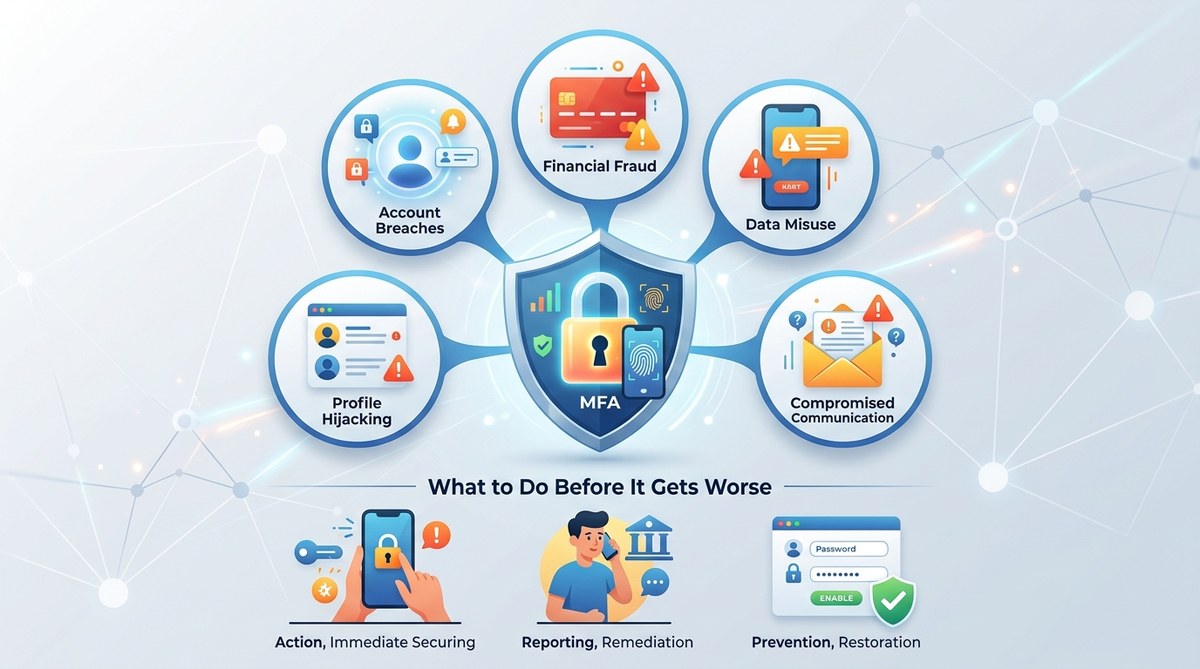
Identity theft shows up in five common patterns: strange charges, failed logins, emails about changes you did not make, friend requests from your own profile, and calls about debts you never owed. Acting within the first 48 hours limits the damage. Freeze your credit, change passwords, and report the theft to the FTC to start recovery.
The Five Red Flags That Mean Someone Has Your Information
Thieves do not always drain your bank account on day one. Sometimes they test the waters. They log into an old account to see what is there. They change a recovery email so they can come back later. Here are the five most common warning signs.
1. Charges or Withdrawals You Cannot Explain
This is the most obvious sign. You check your credit card statement and see a $4 charge from a website you never visited. Or a $50 ATM withdrawal shows up in a city you have not been to. Small test charges are common. Thieves use them to see if the card works before making a bigger purchase.
Check your bank and credit card statements every week. If you see something you do not recognize, call the bank immediately. Do not assume it is a forgotten subscription.
2. Password Reset Emails You Did Not Request
You wake up to three emails saying “Your password has been reset” or “Here is your verification code.” You did not ask for any of them. This means someone is trying to break into your account. Sometimes they already succeeded and locked you out.
If you still have access, change your password right away. If you are locked out, use the “forgot password” link immediately and choose a strong new password that you have never used before.
3. Friend Requests From Your Own Profile
This one is creepy. You get a friend request from someone who looks exactly like you. Or your friends tell you they received a strange message from your account asking for money or gift cards. This means a thief cloned your profile or took over your account.
When your account sends spam or weird links, assume it has been compromised. Alert your friends through a different method like a text message so they know not to click anything.
4. Bills or Collection Calls for Accounts You Never Opened
A debt collector calls about a credit card you never applied for. Or you get a bill for a medical procedure you never had. This is a major red flag. Someone used your Social Security number or personal details to open new accounts in your name.
This type of fraud is harder to fix because it involves your credit report. You will need to file a police report and contact the credit bureaus.
5. Your Login Stops Working on a Site You Use Every Day
You try to log into your email or social media, and your password suddenly does not work. You try to reset it, but the recovery email or phone number on file is not yours anymore. The thief changed your recovery details to lock you out permanently.
This is a full account takeover. Act fast. Contact the platform’s support team and prove your identity with ID documents.
What to Do in the First 24 Hours
Time is critical. The longer a thief has access, the more damage they can do. Follow these steps in order.
-
Freeze your credit. Contact each of the three major credit bureaus: Equifax, Experian, and TransUnion. A credit freeze stops anyone from opening new accounts in your name. It is free and does not hurt your credit score. You can lift it later when you need to apply for a loan or a credit card.
-
Change passwords on all important accounts. Start with email, banking, and social media. Use a password manager to generate and store strong, unique passwords for each site. If you are not using one yet, consider reading Are Password Managers Actually Safe, or Are We Just Trusting Tech Bros With Everything? to understand how they work.
-
Enable two-factor authentication (2FA). This adds a second step to logging in, usually a code sent to your phone or an authenticator app. Even if a thief has your password, they cannot get in without that code.
-
Check your email forwarding settings. Thieves often set up rules to forward your emails to their own inbox. Go to your email settings and look for any forwarding addresses you did not add. Delete them.
-
Report the theft to the FTC. Go to IdentityTheft.gov and file a report. This gives you an official recovery plan and helps if you need to dispute fraudulent accounts later.
Common Mistakes That Make Things Worse
When you panic, it is easy to make a mistake. Here are the most common ones and what to do instead.
| Mistake | Why It Hurts | What to Do Instead |
|---|---|---|
| Clicking links in suspicious emails | Phishing links can install malware or steal your new password | Type the website address directly into your browser |
| Calling the number in a fraud alert email | Scammers often list their own phone number | Use the number on the back of your credit card or the official website |
| Posting about the theft on social media | Thieves monitor your accounts for security questions like your pet’s name | Keep details private and contact friends through text or phone |
| Paying a ransom to get your account back | Thieves rarely return access after payment | Go through official account recovery with the platform |
| Ignoring small unauthorized charges | Thieves test with small amounts before bigger ones | Report every single charge you did not authorize |
How to Scan Your Accounts for Hidden Threats
You do not need to be a tech expert to check for problems. Set aside 15 minutes to run through this list.
- Check your credit report for free at AnnualCreditReport.com. Look for accounts or inquiries you do not recognize.
- Review your bank and credit card transactions for the last 90 days. Look for small charges under $10.
- Open your email settings and look for forwarding rules, filters, or unfamiliar recovery email addresses.
- Check your social media login history. Most platforms show you recent logins and device locations.
- Look at your phone bill for any new lines or numbers you did not add. Thieves sometimes open new phone lines to intercept 2FA codes.
“The best time to catch identity theft is within the first 48 hours. After that, the damage multiplies. Freezing your credit is the single most effective step you can take, and it costs nothing.” — Federal Trade Commission advisory on identity theft recovery
How to Protect Yourself Going Forward
Once you have contained the damage, build habits that make it harder for thieves to target you again.
Use a different password for every account. If one site gets breached, the thief cannot use that password to break into your email or bank. A password manager makes this easy.
Turn on two-factor authentication everywhere that offers it. Use an authenticator app instead of text messages when possible. Text messages can be intercepted if a thief takes over your phone number.
Set up alerts on your bank accounts. Get a text or email for any transaction over $0. That way you know the moment something happens.
Shred documents that have your personal information before throwing them away. Mail theft is still a common way thieves get your details.
Consider using a virtual credit card number for online shopping. Many banks offer this feature. It creates a temporary card number that expires after one use.
What to Do If You Are a Senior or Less Comfortable With Technology
Identity thieves often target older adults because they assume they are less likely to notice small changes. If you are helping a parent or grandparent, or if you feel unsure about the steps above, here is a simpler plan.
Ask a trusted family member to help you freeze your credit. You can do it over the phone with each credit bureau. Write down the PIN they give you to lift the freeze later.
Set up a shared password manager with someone you trust. That way they can help you reset passwords if something goes wrong.
Put a fraud alert on your credit file. This tells lenders to verify your identity before opening new accounts. It lasts one year and is free.
Never give your Social Security number over the phone unless you made the call. Scammers pretend to be from your bank, the IRS, or tech support.
When to Call the Police
Most identity theft does not require a police report. But you should file one if:
- Someone used your Social Security number to file a tax return or get a job.
- A thief opened a bank account or credit card in your name.
- You know who stole your identity.
- A creditor or government agency requires a police report to remove fraudulent accounts.
Bring your FTC identity theft report, any bills or statements that show the fraud, and a photo ID. The police may not investigate, but the report is important for your paper trail.
Your Digital Life Deserves a Second Look
Discovering that someone stole your online identity feels like a violation. It is personal. But you can recover from it. The steps are clear. Freeze your credit. Change your passwords. Report the fraud. Then build better habits so it does not happen again.
You do not have to become a cybersecurity expert. You just need to stay aware. Check your accounts regularly. Trust that sinking feeling when something looks off. And remember that acting fast is your best defense. Take a few minutes this week to review your accounts. It is a small investment that can save you months of stress.